AAAD APK 1.4.4: Best Third-Party App Installer
AAAD APK unlocks a direct solution to help users bypass Google's strict barriers on the car interface. During my hands-on testing on the factory stock car display, this tool functions as an intermediate installation manager. It allows integrating custom map or video playback software without requiring complex device rooting procedures.
What’s New In AAAD v1.4.4 package for Android Auto
AAAD app for Android Auto system brings several important infrastructure adjustments that improve connection stability across modern operating systems.
Optimized compatibility with the latest Android Auto updates on Android 13, 14, and 15.
Reduced sudden app crashing when launching media streaming tools like CarStream.
Updated supported software list stored in the cloud repository.
Fixed device recognition errors on certain models running heavy custom skins.
The lead-in below will take you deeper into the details of the tools this utility supports integrating directly onto your car screen.
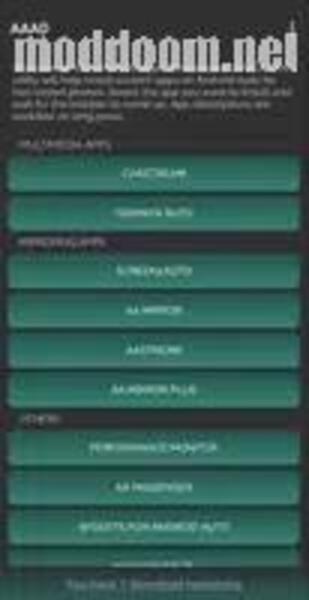
CarStream: Supports streaming live content from YouTube directly onto the head unit.
Fermata Auto: An all-in-one media player supporting external storage playback and TV channels.
Cartube: A lightweight custom version optimized specifically for in-car touch controls.
Screen2Auto: A tool that mirrors your entire smartphone screen onto the car.
AA Mirror: A basic screen mirroring solution for mid-range devices.
Practical testing shows that performance doesn't rely too heavily on the intermediate application itself, but rather on the hardware specs of the smartphone and car screen.
When I connected via a standard cable, operation latency remained within an acceptable range. However, I noticed that the MOD Menu is slightly laggy on older chips when loading high-resolution video streams. For wireless adapter connections, stability drops slightly if there is heavy ambient radio signal interference nearby.
For users interested in mobile entertainment solutions or other custom platforms, checking out AAAD downloader new release details will help you find builds optimized specifically for your device model.
Impact On Safe Driving Experience
Unlocking video viewing or screen mirroring features brings obvious convenience to passengers, but it comes with clear trade-offs regarding driver focus.
This intervention completely alters the original design philosophy of the manufacturer. Without self-regulating usage habits, moving video content can easily distract the driver's vision while on the road.
Pros And Cons Breakdown
Having spent several weeks testing this utility across different head units and mobile devices, I have outlined its core strengths and operational limitations to help you decide if it fits your setup.
Pros
-
No Root Access Required: Unlike traditional Android Auto modifications that force you to unlock your bootloader or root your smartphone, this tool works entirely within standard user permissions.
-
One-Tap App Installation: The streamlined user interface simplifies the deployment process. You simply select your desired tool from the menu, and the installer handles the package extraction automatically.
-
Direct Integration: Once deployed, supported tools appear seamlessly alongside official applications on your car’s native display interface.
-
Bypasses Google's Package Restrictions: It effectively acts as an accepted installation source, allowing third-party tools like CarStream and Fermata Auto to project video and custom media content onto the head unit.
-
Lightweight Footprint: The application occupies under 5 MB of internal storage and runs minimal background processes, preserving overall device battery life.
Cons
-
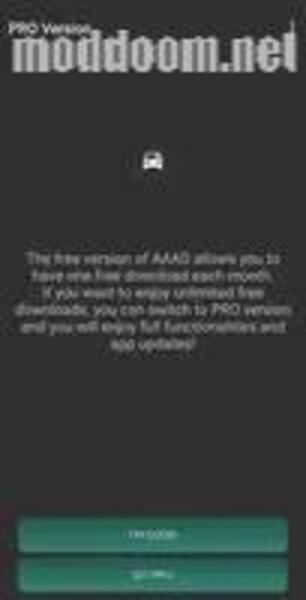
Strict Free Version Quota: The free tier restricts users to only 1 app download per 30 days. Unlocking unlimited downloads requires a one-time Pro upgrade within the app.
-
Vulnerability to Android Auto Updates: Because Google frequently patches its car interface, future system updates can temporarily break compatibility with integrated third-party tools until the developer pushes a fix.
-
Performance Variances on Older Hardware: During my testing on devices with older processors, rendering high-resolution video streams via Screen2Auto caused noticeable menu lag and thermal throttling.
-
Manual Setup Needed for Developer Settings: You still need to manually enable "Unknown Sources" inside Android Auto’s hidden Developer Mode for installed applications to launch properly.
Worthy Alternatives To Consider
If you run into issues during setup or face device incompatibility, here are several alternative routes:
Use an Android Auto Box: An independent hardware solution that turns your stock screen into a full-fledged Android unit without touching your phone.
Root the mobile device: The traditional method allowing deep system intervention to install AA Unofficial Framework, though it requires high technical knowledge and carries security risks.
KingInstaller: A similar installer tool running on PC or unlocked phones that forces installation files into system folders using package installer privileges.
To explore more about mobile entertainment tools for your journey, you can Get AAAD downloader package for your setup.
Final Verdict
In my hands-on testing, AAAD APK offers a practical solution for expanding car entertainment without rooting your phone. While it isn't for everyone especially those requiring absolute native stability it delivers exceptional customization for tech-savvy drivers who prioritize safety above all else.
You are now ready to download AAAD for free. Here are some notes:
- To prevent users from installing apk files from outside, Google Play has now added a warning when installing apks & mods. PlayProtect will tell you the file is harmful. Simply, just click “Install anyway (unsafe)”.







.jpg)
.jpg)